
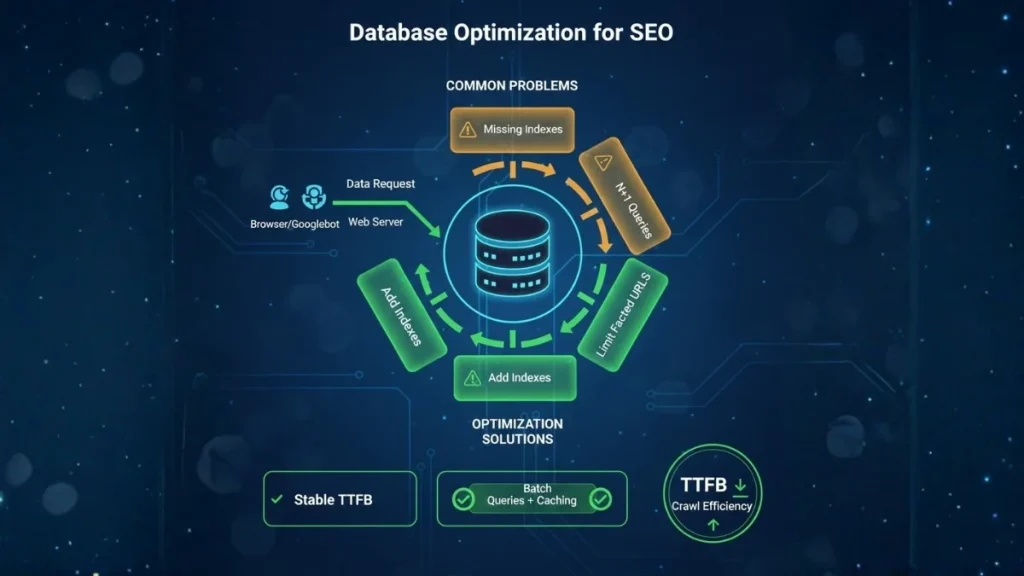
Database performance is one of the most underestimated SEO constraints in B2B. When pages load dynamically (CMS pages, faceted catalogs, knowledge bases), every request triggers database work: fetching content, assembling templates, loading menus, pulling related items, and generating internal links. If those queries are slow, your server response time (TTFB) increases, Core Web Vitals degrade, and crawlers waste time per URL—reducing crawl efficiency and slowing indexing [[What is server response time (TTFB) and why it matters for SEO rankings?]].
This creates a compounding effect. As your content library grows from 500 to 50,000 URLs, inefficient queries scale badly: the site may feel “fine” for humans on a few key pages, but Googlebot hits thousands of URLs, including long-tail templates that expose the slowest database paths. The result is higher error rates (timeouts, 5xx), conservative crawl rates, and delayed discovery of new pages [[How to optimize server configuration for faster crawling and indexing]].
In 2026, database optimization is no longer a developer-only concern. It is an indexing lever. Better queries mean more stable response times during crawl bursts, fewer failures during peak traffic, and a faster path from “published” to “indexed.” It also protects conversion: B2B buyers abandon slow comparison pages quickly, especially on mobile, where latency amplifies backend delays [[What is mobile‑first Technical SEO and how does it impact rankings?]]. This satellite focuses on bottlenecks that matter and the highest ROI fixes that improve SEO without risky platform rewrites [[Server-side performance and rendering: How server configuration impacts SEO rankings in 2026]].
The database bottlenecks that quietly kill SEO
Most “database SEO problems” are not about a slow server. They’re about predictable query patterns that become expensive at scale—exactly the scale Googlebot forces on your site.
- Missing or wrong indexes (the #1 culprit): if a query filters or sorts on a column without an index, the database scans large tables (full table scan). This often appears on category archives, internal search (LIKE queries), and faceted navigation.
- Too many queries per page (N+1 pattern): a page that triggers 120 queries will produce unstable TTFB under load. Typical causes include related-post widgets, template components each fetching their own data, and plugins that add queries invisibly.
- Heavy sorting and joins: sorting by non-indexed fields, large joins, and aggregates (COUNT, GROUP BY) increase CPU time and locking.
- Cache misses (object cache/query cache): if each request recomputes menus, taxonomy lists, and “popular posts,” the DB is doing repeat work that should be cached.
SEO impact:
- TTFB rises → Core Web Vitals get harder to keep “good.” [[What is server response time (TTFB) and why it matters for SEO rankings?]]
- Crawl becomes inefficient → fewer URLs fetched per visit. [[How to optimize server configuration for faster crawling and indexing]]
- Deep pages get discovered later → slower indexing and weaker long-tail visibility.
High‑ROI fixes: improve DB speed without breaking the site
The goal is to reduce “database work per request,” then make what remains predictable under load.
- Fix the slowest queries first (not “all queries”): start with 1–3 templates that generate most organic landings, then isolate queries with long execution time, high rows examined, and high frequency.
- Add/adjust indexes based on real filters: index the columns you actually filter/sort on most (status, post_type, taxonomy relations, published date, product attributes). Indexing the wrong columns is wasted.
- Reduce query count (kill N+1): batch-fetch related content, preload menus/taxonomies once, and remove widgets/plugins that hit the DB on every request.
- Implement object caching (Redis/Memcached): cache menus, taxonomy lists, “related” blocks, and expensive computed results to stabilize performance during crawl bursts and peak traffic.
- Separate SEO pages from “infinite filters”: limit which facet combinations can be crawled/indexed to protect crawl budget and reduce DB load at the same time.