
Your customers are already searching for you (But Can They Find You?)
A potential customer needs your service right now.
Maybe their plumbing pipes burst at 2 AM. Maybe they need a dentist for a broken tooth. Maybe they’re looking for an HVAC contractor because their air conditioning died on the hottest day of summer.
What do they do? They grab their phone and type one of these searches into Google:
- “Emergency plumber near me”
- “Dentist open now”
- “AC repair close to my location”
Here’s the problem: If you’re not showing up in those results, someone else is. And they’re getting the customer. And the money.
This is where Local SEO comes in. And don’t worry you don’t need to be a tech expert to understand it.
In this beginner’s guide, we explain:
- What local SEO actually is (in plain English, no jargon)
- Why it matters for your business (real numbers on how much money is at stake)
- Exactly what to do (step-by-step, beginner-friendly actions)
- What to expect (realistic timeline for seeing customers call and visit)
By the end, you’ll understand how to get your business visible on Google—and why doing this can be the smartest investment you make this year.
Let’s start with the basics.
What is local SEO? (plain english definition)
Local SEO is the practice of making your business easier to find on Google when people in your area search for services like yours.
That’s it. That’s the core concept.
Think of it this way:
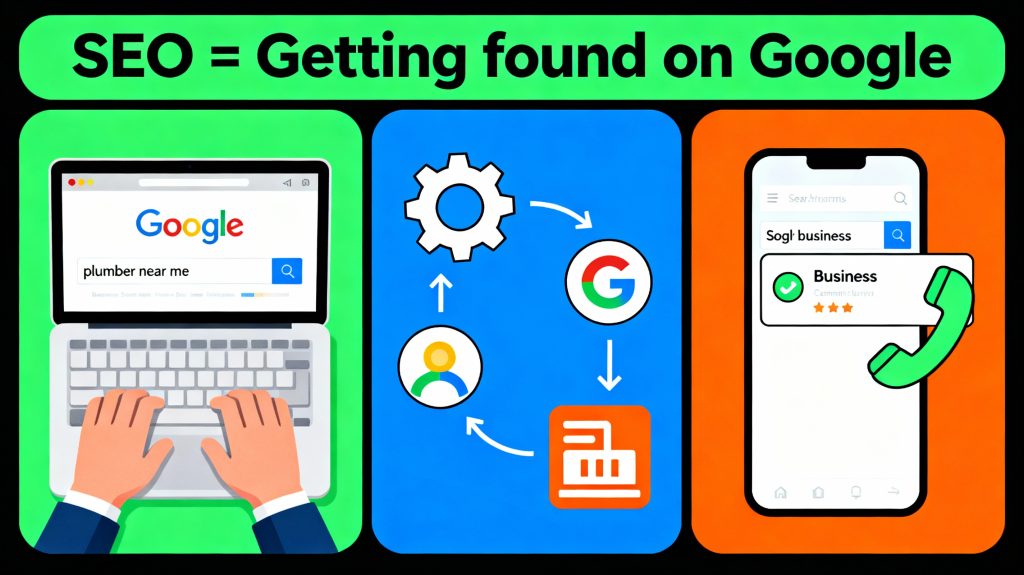
Google’s job is to connect people looking for a service with the businesses that provide that service. Your job is to make it easy for Google to know you exist and to match you with customers searching for exactly what you offer.
That’s local SEO.
How local SEO actually works (3 simple steps)
Step 1: Customer searches
Someone in your area types “emergency plumber near me” or “dentist open on Saturday” into Google.
Step 2: Google searches for matches
Google looks at thousands of local businesses and asks: “Which plumber is closest to this person? Which dentist has the best reviews? Which one actually shows up on Google Maps?”
Step 3: Google shows results
The businesses that Google trusts most (based on location, reviews, completeness of information) appear at the top. Those businesses get the phone calls. The others get nothing.
Your goal: Be the business Google shows first.
Why local SEO matters (the money)
Let’s talk about what’s actually at stake.
46% of all Google searches have local intent meaning people are searching for a business near them, right now. That’s billions of searches per month from people actively looking for exactly what you offer.
Here are the numbers:
Translation: The customers you need are actively searching on Google right now. The only question is: will Google show them your business or your competitor’s?
Real money exampl:
Let’s say you’re a plumbing contractor in Denver.
Without local SEO:
- You get 30 leads/month from word-of-mouth and old customers
- You close 20% of leads = 6 jobs/month
- Average job: $2,000–$3,000
- Monthly revenue: $12,000–$18,000
With local SEO (6 months in):
- You’re ranking top 3 on Google Maps for “plumber near me Denver”
- You get 50 to 60 leads/month (30 from word-of-mouth + 20 to 30 from Google)
- You close 20% = 10 to 12 jobs/month
- Monthly revenue: $20,000 to $36,000
Difference: +$2,000 to $18,000/month in additional revenue. From free, owned traffic.
Cost to implement: $0–$100 (and 20 hours of your time over 3 months, or outsourced for $500 $1,500)
ROI: Infinite (if you do it yourself) or 10–20x (if you hire help)
That’s why local SEO matters.
How google decides which business to show first
Google uses a simple system: it looks at signals to decide which business is best for each search.
Think of it like a restaurant review system. Google asks:
- “Is this business real?” ✓ (Does it have verified information?)
- “Is it close to the person searching?” ✓ (Proximity matters)
- “Do customers trust it?” ✓ (Reviews and ratings matter)
- “Is it complete and professional?” ✓ (Information accuracy matters)
- “Is it actively managed?” ✓ (Freshness and engagement matter)
Businesses that score well on all of these show up first. Those that score poorly show up on page 5 (or not at all).
The #1 Place google checks: google business profile
Your Google Business Profile (GBP) is where Google stores your business information. It’s like an ID card for your business.
When someone searches “plumber near me,” Google checks your GBP to see:
- Your location (proximity match?)
- Your photos (does it look professional?)
- Your reviews (do customers trust you?)
- Your hours (are you open right now?)
- Your description (are you really a plumber?)
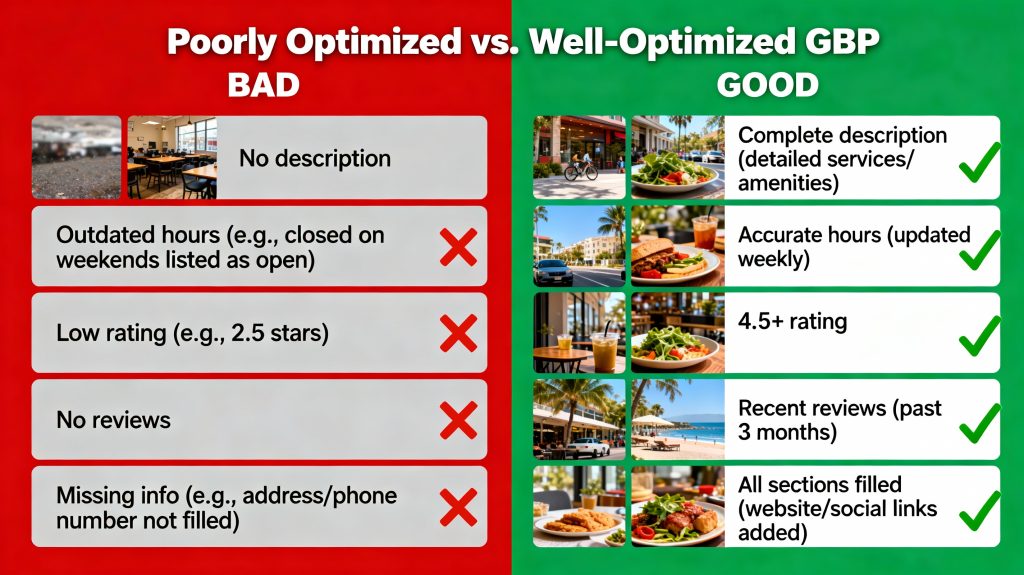
If your GBP is empty or incomplete, Google essentially tells customers: “I’m not sure about this business, so I won’t show it first.”
That’s the #1 reason most small businesses don’t rank. They don’t have a complete Google Business Profile.
Where your business needs to show up (Google Maps vs. Organic Results)
When someone searches on Google, they see different types of results. You need to understand which one matters most for your business.
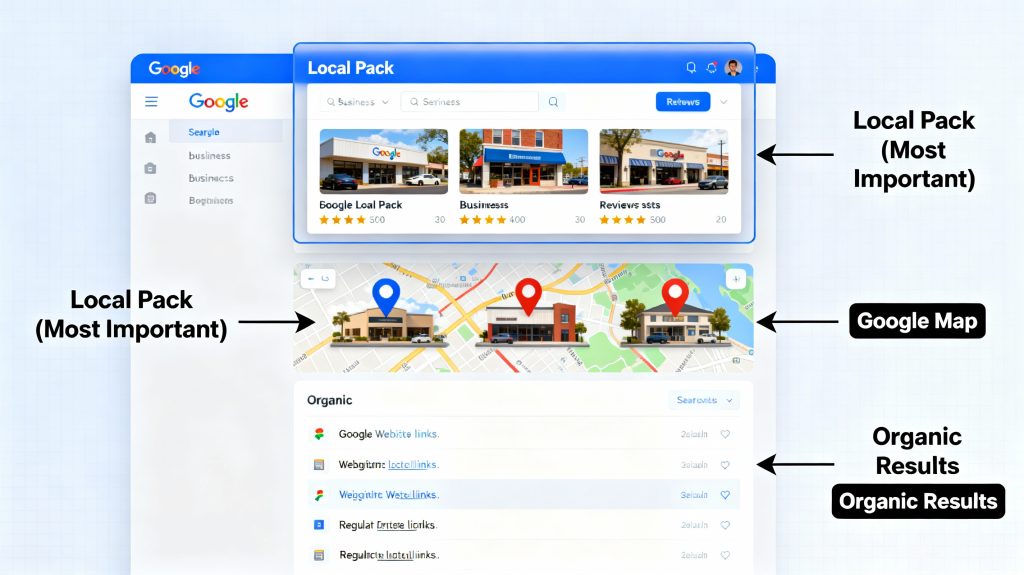
The local pack (The #1 Priority)
At the very top of Google search results, when someone searches “plumber near me,” there’s a special section called the Local Pack. It shows the top 3 businesses with:
- Business photo
- Name and rating (4.5 stars, 120 reviews, etc.)
- Address
- Phone number (clickable to call)
- One-click directions button
This is where you need to be. The Local Pack gets 50–70% of all clicks from local searches.
If you’re in the Local Pack, customers can:
- Click to call you instantly
- Get directions
- Read your reviews
- See your photos
If you’re not in the Local Pack, they scroll down to find your competitor.
Google map results (second priority)
Below the Local Pack, there’s a Google Map with pins showing all local businesses. Customers can click on businesses to see details.
Ranking here is good, but not as good as the Local Pack.
Organic Search Results (Third Priority)
Below the map, you see regular website links (like normal Google search results). These get fewer clicks than the Local Pack, but they still matter for credibility.
Priority ranking:
- Local Pack (top 3 businesses on maps) = 85% of your focus
- Google Map (showing up at all) = 10% of your focus
- Organic results (your website ranking) = 5% of your focus
Section 1: the google business profile (your foundation)
Your Google Business Profile is the starting point for everything. Get this right, and Google will start showing you in results.
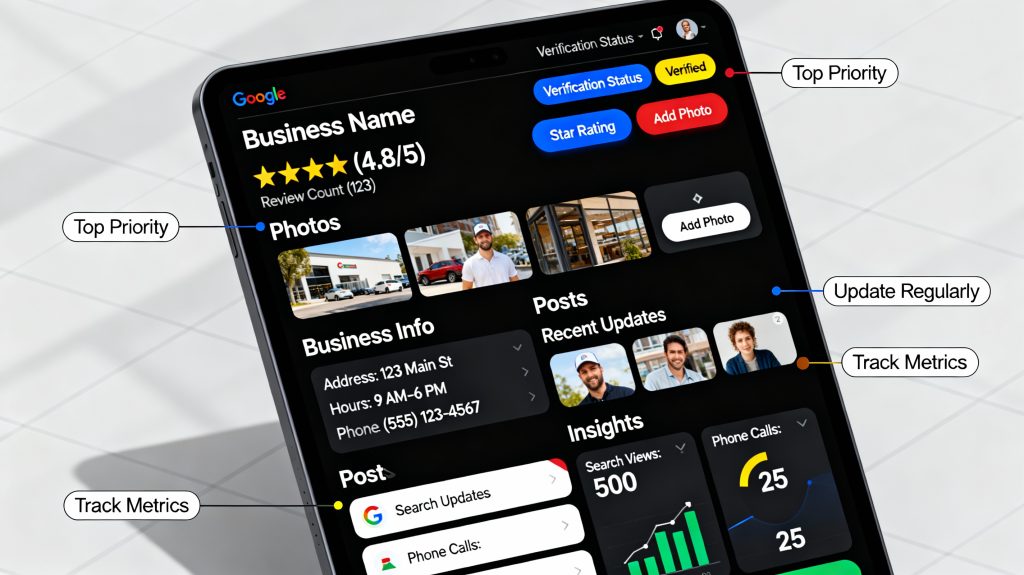
What is a (GBP) Google Business Profile?
A Google Business Profile is a free, official listing for your business on Google. It shows up on Google Maps and in search results when people look for businesses like yours.
Think of it as your “business card on Google.” It tells customers:
- What you do
- Where you are
- Your phone number
- Your hours
- Customer reviews and ratings
- Photos of your work
- Posts/updates you’ve shared
You probably already have one. If someone searches your business name on Google Maps and your business appears, you have a GBP. If not, you need to create one (takes 10 minutes).
Why your GBP matters (real impact)
Businesses with complete, well-optimized GBP listings get:
- 42% more direction requests than poorly optimized listings
- 2,717% more direction requests if they have 100+ photos (vs. no photos)
- 25% more clicks if they have a 4.5-star rating vs. 3.5-star rating
- 10–20% more phone calls from their GBP alone (first 90 days)
These are massive numbers. This is your highest-ROI tactic.
The simple GBP setup (for complete beginners)
If you’re brand new, here are the 5 essential things to set up:
1. Verify your business (Day 1)
- Go to Google Business Profile
- Search for your business name
- Click “Manage this business”
- Google will ask you to verify by postcard, phone, or email
- Pick postcard (standard method)—takes 5–7 days
- Result: Your business is officially verified on Google
2. Add your business name, address, and phone (Day 1)
- Use your exact legal business name
- Use a complete street address (not a PO box if you have a physical location)
- Use one main phone number
- Critical: Make sure this matches exactly what’s on your website, invoices, and business cards. Any difference confuses Google.
3. Set your category (Day 1)
- Pick what you do: “Plumber,” “Dentist,” “HVAC Contractor,” etc.
- Be specific and accurate
- Why: Google uses this to match you with people searching for exactly your service
4. Add business hours (Day 1)
- Your standard hours (Monday–Friday, Saturday, etc.)
- If you offer 24/7 service, mark that
- Update for holidays (Christmas, Thanksgiving, etc.)
- Why: Customers see this immediately. Wrong hours = lost customers
5. Write a short description (Day 2)
- 1 to 2 sentences about what you do
- Include what makes you unique (“Licensed,” “Family-owned,” “24/7 service,” etc.)
- Example: “Emergency plumbing service in Denver. Licensed, insured, available 24/7. Water heater, drain cleaning, and burst pipe repairs.”
- Why: This helps Google understand exactly what your business is
Time to complete: 20–30 minutes
Impact: Just doing this puts you ahead of 70% of your competitors who don’t have a complete profile.
Why photos matter (A Lot)
This is the #1 thing beginners skip. Don’t skip this.
Businesses with photos get dramatically more customers. Here’s the data:
- No photos: 0 direction requests
- 5 photos: 50 direction requests (average)
- 20 photos: 500 direction requests
- 100+ photos: 2,717% more direction requests
What photos to upload (minimum 10, ideal 20+):
- Your business exterior (storefront or office)
- Your business interior (office, waiting room, workspace)
- Team photos (you and your team at work)
- Before/after photos (your best work)
- Products/services (what you offer)
- Inside photos (show your professionalism)
How to upload:
- Go to your GBP
- Click “Photos”
- Upload directly or use your phone camera
- Add a simple caption to each (“Our team ready to serve” or “Kitchen remodel – Denver”)
Reality check: This takes 1–2 hours to collect and upload 20 photos. But it’s worth it. These 20 photos will bring you 500+ direction requests over time.
Going deeper: For a complete step-by-step photo strategy, including exactly what to shoot and how to do it, you can visit our detailed Google Business Profile optimization guide.
Section 2: how google decides to rank you (for beginners)
Google doesn’t just randomly pick businesses. It uses a system (an “algorithm”) to decide which businesses are best for each search.
You don’t need to understand all of Google’s algorithm. But understanding these 5 key signals will help you prioritize what to work on.
The 5 signals google looks at (in priority order)
Signal #1: Your Google Business Profile Quality (25% importance)
Is your profile complete? Do you have photos? Good description? Accurate hours? Impact: HUGE
Signal #2: Proximity (20% importance)
How close are you to the person searching? If someone searches “plumber near me” from Denver, Google shows Denver plumbers first. You can’t fake this, but you can make sure your address is accurate.
Signal #3: Customer Reviews (15% importance)
Do you have reviews? Are they recent? What’s your rating? impact: HUGE
People trust businesses with reviews. Google ranks businesses with more reviews higher.
Signal #4: Citations (8% importance)
Citations are mentions of your business on other websites (Yelp, BBB, HomeAdvisor, local directories, etc.). More citations = more trust signals to Google. impact: MEDIUM
Signal #5: Backlinks (7% importance)
These are links from other websites to your website. “Backlinks” = authority signal. impact: MEDIUM-LOW
What this means for you (priority order)
Don’t try to do everything at once. Do them in order:
Priority 1: Complete and optimize your Google Business Profile (covers Signal #1)
- This is 80% of your work and gives you 50–60% of your ranking power
- wait for our [GBP optimization guide S1] for the complete step-by-step checklist
Priority 2: Get customer reviews (covers Signal #3)
- This is 15% of your work and gives you 15–20% of your ranking power
- Wait for our [customer reviews guide S4] for a step-by-step system to generate reviews automatically
Priority 3: Build citations (covers Signal #4)
- This is 10% of your work and gives you 8–10% of your ranking power
- Wait for our [local citations guide S3] for where to build citations and how
Priority 4: Build backlinks (covers Signal #5)
- This is 5% of your work and gives you 5–7% of your ranking power
- Skip this initially. Focus on 1–3 first
If you do Priority 1 + Priority 2 + Priority 3, you’ll have 70–80% of the ranking power. That’s enough to dominate locally.
Section 3: what keywords do your customers actually search? (real data)
Before you optimize anything, you need to understand what people are actually searching for.
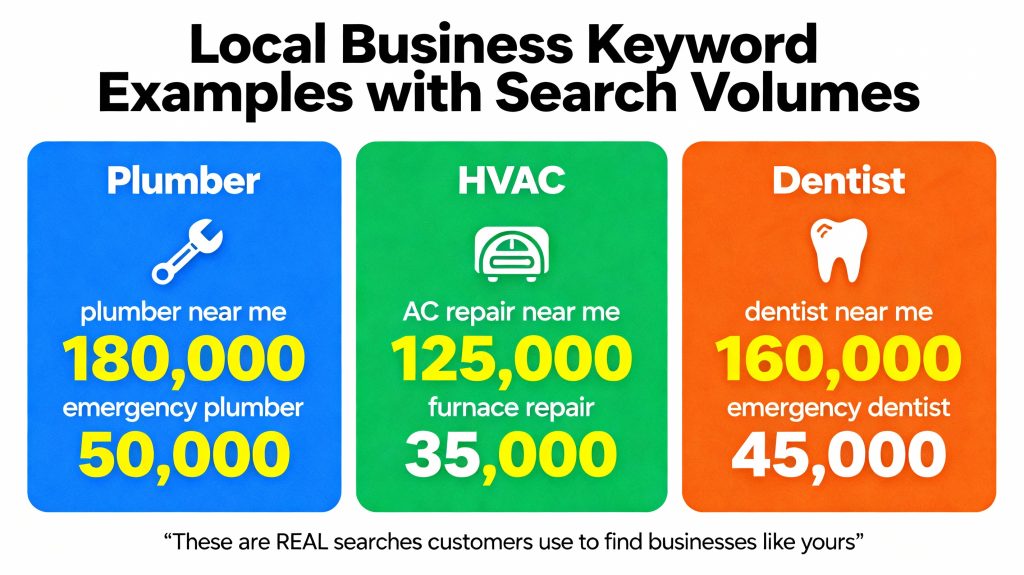
These are real searches from real customers looking for businesses like yours.
High-volume keywords you should know about
| Service | Top Keyword | Search Volume/Month | What It Means |
|---|---|---|---|
| Plumber | “plumber near me” | 180,000+ | 180,000 people per month searching for a plumber in their area |
| “emergency plumber” | 50,000+ | 50,000 people searching for emergency help right now | |
| HVAC | “AC repair near me” | 125,000+ | 125,000 people looking for air conditioning repair |
| “furnace repair” | 35,000+ | People looking for heating repair | |
| Dentist | “dentist near me” | 160,000+ | 160,000 people looking for dental services |
| “emergency dentist” | 45,000+ | People with urgent dental problems | |
| Electrician | “electrician near me” | 95,000+ | 95,000 searches for electrical work |
| “emergency electrician” | 30,000+ | Urgent electrical repairs |
What this means for you:
If you’re a plumber in Denver and you rank #1 for “plumber near me,” you could capture just 1% of those searches = 1,800 leads/month. At a 20% close rate, that’s 360 new customers per month.
Even if you only capture 0.5% of searches = 900 leads/month = 180 new customers.
Even capturing a small percentage of these high-volume searches is life-changing for your business.
Keywords you should optimize for
Focus on these patterns:
- Your service + “near me”: “plumber near me,” “dentist near me,” “HVAC near me”
- Your service + your city: “plumber Denver,” “dentist Austin,” “electrician Chicago”
- Your service + “emergency”: “emergency plumber,” “emergency dentist,” “24/7 AC repair”
- Your service + problem: “water heater repair,” “tooth extraction,” “furnace leak”
For a complete keyword research guide (finding keywords specific to your service area), you can visite our local SEO ranking factors guide
Section 4: customer reviews (the trust factor)
Reviews are one of the most powerful ranking signals. But more importantly, reviews convince people to hire you.
76% of customers won’t choose a business below 3-star rating. 90% prefer businesses with 4.5+ stars.
This means:
- No reviews = customers assume you’re new or bad
- Few reviews (5–10) = maybe okay, but…
- Many reviews (50+) with 4.5+ stars = people trust you immediately
The simple review system (for beginners)
Don’t overcomplicate this. Here’s the beginner system:
Step 1: After you complete a job/appointment, ask for a review
- “Would you mind leaving a quick Google review? It helps customers find us.”
- Send via text or email: “Click here to leave a review: [direct link]”
- Ask within 24 hours (while they’re still happy)
Step 2: Make it easy
- Include a direct link to your Google review page (not just “Google my business”)
- If using a QR code, include a printed card with the QR code
Step 3: Respond to all reviews
- Positive: “Thank you for choosing us! We loved helping you.”
- Negative: “We’re sorry you had this experience. Please call us at [phone] so we can make it right.”
Timeline: Aim for 3–5 reviews per month initially. After 6 months, you’ll have 20–30 reviews. After 12 months, 50+ reviews.
Impact: With 50+ recent reviews and a 4.5+ rating, you’ll rank in the Local Pack for most local searches.
For a complete automated review generation system, you can visite our customer reviews and local SEO guide
Section 5: citations (building authority)
A citation is simply a mention of your business name, address, and phone number (called “NAP”) on another website.
Examples:
- Your listing on Yelp
- Your profile on HomeAdvisor (if you’re a contractor)
- Your listing on BBB (Better Business Bureau)
- Your directory entry on local business sites
Why citations matter:
Google uses citations to verify that your business is real and trustworthy. More citations = more authority signals = better rankings.
The simple citation system (for beginners)
Step 1: Make sure your NAP is consistent everywhere
Your business name, address, and phone must be EXACTLY the same everywhere. One character different = inconsistency.
Check these places:
- Your website
- Google Business Profile
- Yelp
- BBB
- Business cards
- Email signature
Fix any differences.
Step 2: Add your business to high-authority directories
Spend 2–3 hours adding your business to these key sites:
- Yelp
- Google (already done)
- Apple Maps
- Bing Places
- BBB
- HomeAdvisor (if contractor/service-based)
For a complete step-by-step citation building guide with all directories and how to use data aggregators, you can visite our local citations strategy guide
90-Day beginner action plan (what to do right now)
You now understand the basics. Here’s exactly what to do in the next 90 days:
Weeks 1–2: setup phase
Goal: Get your foundation in place
Actions:
- Claim/verify your Google Business Profile (10 minutes)
- Fill in all basic info: name, address, phone, hours, category (15 minutes)
- Upload 10–20 photos of your business (2 hours)
- Write a 1–2 sentence description (10 minutes)
Time investment: 3 hours total
Expected results: Nothing yet—seeds planted
Weeks 3–4: early action phase
Goal: Generate first reviews and citations
Actions:
- Ask 5–10 satisfied customers for Google reviews (send via email or text)
- Add your business to Yelp, Apple Maps, Bing Places (if not already there)
- Respond to any new reviews
- Share 1–2 photos/posts on your GBP
Time investment: 2–3 hours total
Expected results: First reviews posted; maybe 1–2 ranking improvements
Weeks 5–8: acceleration phase
Goal: Build reviews and citations at scale
Actions:
- Continue asking customers for reviews (aim for 5–10/week)
- Add your business to industry-specific directories:
- Contractors: HomeAdvisor, Angie’s List, Porch, Thumbtack
- Dentists/Medical: Healthgrades, Zocdoc, Vitals
- Other services: Find your industry’s directory
- Respond to all new reviews within 24 hours
- Post 2–3 times on your GBP (special offers, team updates, photos)
Time investment: 4–5 hours total
Expected results: 15–20 new reviews; 2–3 position ranking improvements; 10–20% increase in GBP views
Weeks 9–12: momentum phase (maintenance)
Goal: Maintain momentum and dominate locally
Actions:
- Continue review requests (aim for 2–3/week ongoing)
- Respond to all reviews same-day
- Post on GBP weekly (photos, updates, special offers)
- Track your progress in GBP Insights (views, clicks, calls)
Time investment: 2–3 hours/week
Expected results: 50+ total reviews; top-3 ranking for main keywords; 25–40% increase in calls
What to expect: realistic timeline
Month 1:
- Your GBP is complete
- 5–10 new reviews
- First reviews show up
- Ranking movement possible
- Results: Maybe a few new customers from Google
Month 2–3:
- 15–30 total reviews
- Visible ranking improvements (1–2 positions higher)
- 10–20% increase in GBP views
- 5–10 new customers from Google
- Results: Phone starting to ring a bit more
Month 4–6:
- 50+ reviews
- Top-3 ranking for main keywords (especially “near me” searches)
- 25–40% increase in calls
- Dominating local competition
- Results: Noticeable revenue increase ($1,000–$5,000/month for most)
Month 6–12:
- 75+ reviews with 4.5+ rating
- Consistent top-3 local pack ranking
- Local market dominance
- Results: Sustained revenue increase ($3,000–$10,000+/month)
Real money example (Contractor):
- Before: 30 leads/month → 6 jobs/month → $12,000/month
- After 6 months: 50 leads/month → 10 jobs/month → $20,000/month
- Difference: +$8,000/month = +$96,000/year
Common beginner mistakes (don’t make these)
Mistake #1: Ignoring your Google Business Profile
Most beginners never even look at their GBP. It sits empty. Google can’t rank what it can’t understand.
Fix: Spend 2–3 hours completing your GBP. It’s your foundation.
Mistake #2: Wrong business name or address
Using “Joe’s Plumbing LLC” on your GBP but “Joe Plumbing” on your website confuses Google. Inconsistency kills rankings.
Fix: Use exact same business name and address everywhere. Use a spreadsheet to track.
Mistake #3: No photos
Businesses with no photos don’t rank. It’s that simple.
Fix: Take 20 photos this week. Spend 2 hours. Post them. See results.
Mistake #4: Never asking for reviews
You have 500 happy customers but zero reviews because you never asked. That’s lost opportunity.
Fix: After every happy customer, ask for a review. Include a direct link. Make it easy.
Mistake #5: Giving up too early
Local SEO takes 60–90 days to show real results. Many beginners quit after 30 days because they see nothing.
Fix: Commit to 90 days. By week 12, you’ll see noticeable results.
Your next move: start this week
You now understand local SEO. You know what moves rankings. You know what to do.
The only thing between you and more customers is action.
Pick one thing from your 90-day plan and do it this week:
- Monday-Wednesday: Complete and optimize your GBP (core 5 sections)
- Thursday-Friday: Upload 10–20 photos
- Next week: Ask 10 satisfied customers for reviews
That’s it. You don’t need to understand everything. You just need to start.
In 90 days, when you’re getting 2–3x more phone calls from Google, you’ll be glad you did.